How do I program my car's built-in garage door opener?
Park outside the garage, clear the built-in buttons if this is the first time, then hold your handheld remote 1 to 3 inches from the car's button and press both until the light changes. If the light flashes rapidly, you have a rolling code opener: press the Learn button on the motor unit, then press the car button within 20 seconds, up to 3 times.
Free to ask. Local shops send quotes, and you pay only when you book one.
By Kasra Taheri, Founder, LoclisPublished
Researched and drafted with AI, then checked claim by claim against the sources listed below before it was published. Prices and rules change; the dates beside each source say when it was last checked.
Step by step
Read when to stop and call a pro, further down this page, before you start.
Step 2: Clear the buttons the first time
Press and hold the outer two buttons for 10 seconds, until the indicator light changes from solid to flashing rapidly. Skip this when training an additional button.[1]
Step 3: Copy the handheld remote
Holding the remote 1 to 3 inches (3 to 7 cm) from the car's buttons, press and hold the button you want to train and the button on the remote together, until the indicator changes from flashing slowly to solid or flashing rapidly.[1]
Step 4: Test the trained button
Press and release it. A solid light means a fixed code device and the door should move.[1]
Step 5: Spot a rolling code opener
If the door does not move and the light flashes rapidly, you likely have a rolling code opener and need the next steps.[1]
Step 6: Press Learn on the opener
On the motor unit in the garage, find the Learn, Smart or Program button and press it. Use a stepladder or other sturdy device if you cannot reach it, and never stand on the vehicle.[1]
Step 7: Finish within 20 seconds
Return to the car, then press and release the trained button, repeating up to 3 times.[1]
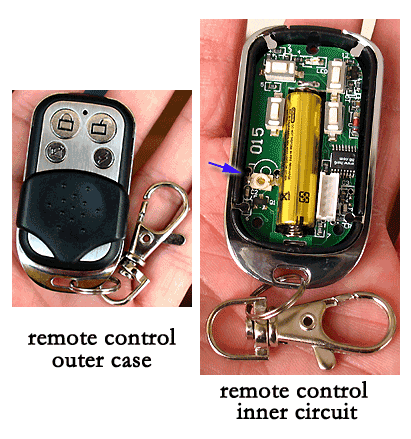
The short version: copy your handheld remote's signal to the button in the car, and if the opener uses rolling code, finish by pressing the Learn button on the motor unit. The job needs no tools beyond, sometimes, a stepladder.
Start with your owner's manual. HomeLink, the system built into most cars, says "Your owner's manual should always provide the most accurate training instructions".[1] What follows is the generic method that works for most compatible openers.
Before you start
The buttons are typically in the vehicle's mirror, overhead console, or center stack.[1] Before programming, make sure that people and objects are out of the way, and park your vehicle outside of the garage.[1] The door may move as you work.
Put a fresh battery in the handheld remote first. HomeLink's advice is: "We recommend getting a new battery for your garage door remote for more accurate programming."[1] A weak battery can make the copy less reliable.
Step 1: clear the buttons (first time only)
If this is the first time you are training the system, press and hold the outer two buttons for 10 seconds.[1] Do not let go until the indicator light changes from solid to flashing rapidly. Skip this step when you are training a second or third button, or you will erase the first.
Step 2: copy the handheld remote
Holding your handheld remote 1 to 3 inches from the buttons, press and hold the car button you want to train and the button on the remote at the same time.[1] Keep both held until the light changes from flashing slowly to solid or flashing rapidly.
Then press and release the trained button. A solid light means a fixed code device, and the door should now move.[1]
Step 3: if the light flashes rapidly, finish with rolling code
If the door does not move and the light is flashing rapidly, you likely have a rolling code opener.[1] The steps from here are time sensitive and may need to be tried more than once.[1]
- On the motor unit in the garage, find the Learn, Smart or Program button. Its shape and color vary by manufacturer.[1] Chamberlain, for example, lists learn button colors of green, orange/red, purple and yellow for its visor remote.[3]
- Press it. On some brands a light on the unit begins blinking.
- Within 20 seconds, go back to the car, press and release the trained button, and repeat that up to 3 times.[1]
A second person makes this quicker, because the clock starts the moment you press Learn. If you need a ladder to reach the unit, use a stepladder or other sturdy device and do not stand on your vehicle.[1]
Programming a second button or changing one
Skip the clearing step and repeat the same method on a button that is not yet programmed. To overwrite a single button without disturbing the others, HomeLink describes a separate procedure: hold the button for about 20 seconds until the light flashes slowly, then present the handheld remote while still holding it.[1]
When it still does not work
HomeLink says compatibility is not assured in all geographies and with all device manufacturers.[1] HomeLink also notes that integration and user interface vary by vehicle make and model year, so search for your vehicle on its programming page and check your opener's manual.[2]
Before selling or returning a leased vehicle, clear the buttons so the next owner cannot open your garage; HomeLink recommends it.[1]
Stop and call a pro if
- The door acts up while you test it. If it will not close all the way, reverses oddly, or moves crooked, the problem is the door or opener, not the car. See garage door repair answers.
- You cannot reach the Learn button safely. Do not climb on the car or on anything unstable. Get a second person or a proper stepladder, or have a technician do it.
- The motor unit has no Learn button you can find, or the opener is old enough that the car cannot be matched to it. A technician can confirm compatibility or fit a replacement receiver.
- Anything involves the springs, cables or tracks. Those are under tension and are not part of this job at all.
Getting help in Virginia
If the handheld remote itself is the problem, start with what a replacement costs. You can also browse garage door repair businesses on Loclis, and read the general guide to garage door repair costs.
When you want a technician to program the car or replace the opener's receiver, describe the job once and local pros quote it.
Common questions
- Where is the built-in opener in my car?
- HomeLink says its buttons are typically in the vehicle's mirror, overhead console or center stack, depending on make, model and year. Your owner's manual shows the exact place and is the most accurate guide to training it.
- Why does the light keep flashing and the door will not move?
- A rapidly flashing light after copying the remote usually means the opener uses rolling code. The copy is not finished until you press the Learn, Smart or Program button on the motor unit and then press the car's button within 20 seconds, up to 3 times.
- Do I need a ladder?
- Often, because the Learn button is on the motor unit, which usually hangs from the garage ceiling. Use a stepladder or another sturdy device, ask a second person to help, and never stand on the vehicle.
- Will it work with every garage door opener?
- Not always. HomeLink says compatibility is not assured in all geographies and with all device manufacturers. Check the compatibility list for your car and your opener's brand before buying anything.
- Should I clear the buttons before selling the car?
- Yes. HomeLink recommends clearing any programmed buttons before returning a leased vehicle or selling your vehicle, by pressing and holding the outer two buttons for 10 seconds until the light changes from solid to blinking.
Sources
- [1] Generic HomeLink Training Instructions, HomeLink (Gentex Corporation). Checked October 27, 2026.
- [2] HomeLink Programming, HomeLink (Gentex Corporation). Checked October 27, 2026.
- [3] 3-Button Visor Garage Door Remote (G953EV-P2), product page, The Chamberlain Group. Checked October 27, 2026.
Want a pro to handle it?
Describe the job once. Licensed local businesses send quotes, and you pay only when you book one.
Get a quote for Garage Doors