Why did my garage door remote stop working?
The usual cause is a worn-out coin-cell battery, so replace that first. If a fresh battery does not help, the opener may have lost the remote's code and it needs reprogramming with the Learn button. If the wall button fails too, the problem is the opener or its power, not the remote.
Free to ask. Local shops send quotes, and you pay only when you book one.
By Kasra Taheri, Founder, LoclisPublished
Researched and drafted with AI, then checked claim by claim against the sources listed below before it was published. Prices and rules change; the dates beside each source say when it was last checked.
Step by step
Read when to stop and call a pro, further down this page, before you start.
Step 1: Try the wall button
Press the wall control inside the garage. If it works, the opener and door are fine and the fault is in the remote or its pairing.
Step 2: Stand closer and watch the remote
Press the remote from just outside the door, aiming at the opener. If its light stays dark or dim, the battery is the likely cause.
Step 3: Swap the battery
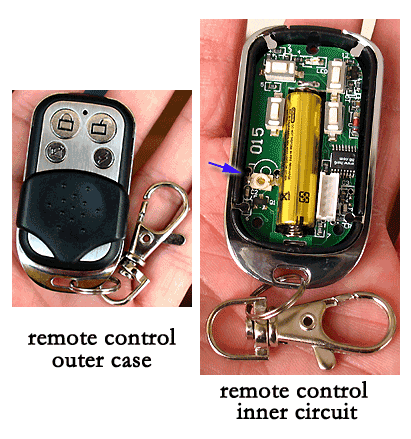
Open the remote and fit a fresh coin cell of the type printed on the old one. Chamberlain's visor remote uses a 3V coin-cell lithium CR2032.[1]
Step 4: Test again
Press the remote at the door. If it works, stop here.
Step 7: Check the remote matches
If it will not pair, compare the Learn button color on the motor unit with the colors the remote lists as compatible.[1]
Step 8: Replace the remote if needed
If a new battery and re-pairing change nothing, the remote itself has failed; buy a matching one or a universal remote.
A garage door remote usually stops working because its battery has run down. Replace the battery first, then re-pair the remote if it still does nothing. If the wall button also fails, the cause is the opener or its power, not the remote.
Start with the wall button
Press the wall control inside the garage. If the door moves, the opener, its power and the door are fine, and you are chasing a remote problem. If the wall button does nothing either, skip to the signs below and read why a garage door opener runs but the door doesn't move if the motor hums but the door stays put.
The battery is the usual cause
A remote that works only when you are close to the door, or needs two or three presses, is nearly always short of battery. Chamberlain's visor remote runs on a 3V coin-cell lithium CR2032 battery.[1] Check the type printed on the old cell before buying, because not every remote uses the same one.
Open the case with a coin or small screwdriver, note which way the cell sits, and fit the new one the same way. Press the button and watch the remote's light. HomeLink, the system built into many cars, makes the same point for programming: "We recommend getting a new battery for your garage door remote for more accurate programming."[4] A new battery is the right starting point for any remote fault.
For how often to swap it, see how often to replace the battery in a garage door remote.
If it still fails, re-pair the remote
If the opener has lost the remote's code, or the remote was never paired, it will do nothing. Re-pairing takes a minute with the Learn button. Chamberlain says it sits under the garage door opener light cover, on the same side as the antenna.[2] You will probably need a stepladder or other sturdy, safe device to reach it.[4] Do not stand on your vehicle.[4]
Then press and immediately release the Learn button.[3] Within 30 seconds, press and hold the button on the remote you want to use.[3] The opener lights flash, or you hear two clicks.[3] That means it has taken. Other brands place and label the button differently, so check the manual for yours.
Make sure the remote fits the opener
A remote only works with openers it is built for. Chamberlain matches its remotes to the Learn button color on the opener, and lists green, orange/red, purple and yellow.[1] If your motor unit has no Learn button, Chamberlain points to universal remotes that work with most brands.[2] For costs, see what a replacement remote or keypad costs in Virginia.
Other things worth a look
- Distance and obstructions. Test the remote from the same spot twice, once pointed at the opener and once not. If range has shrunk, it is the battery.
- A sticky button. A remote that has been dropped or left wet can have a button that no longer makes contact. Press each button; if only one is dead, the remote is worn.
- Several remotes failing at once. The opener's receiver is the suspect, not the batteries.
- Your car's buttons. If only the in-car buttons fail, see programming a car's built-in garage door opener.
Stop and call a pro if
- The wall button and every remote do nothing, or the opener does not even try to move. That is an opener, power or wiring fault, not a remote fault. Do not open the motor unit.
- The door moves a little, then stops or reverses. Look at the safety sensors first; see how to align garage door safety sensors.
- The door is crooked, jammed or heavy by hand. Do not keep pressing the remote. Springs and cables are under tension and are work for a trained technician.
- You cannot reach the Learn button safely. Do not climb on a car, a wobbly chair or a shelf.
- Nothing pairs at all. The remote may be incompatible, or the receiver may have failed, and a technician can test it.
Getting help in Virginia
Loclis lists licensed garage door businesses across the state. Browse garage door repair, read more garage door answers, or describe the problem once and local companies can quote it.
Common questions
- Why does my remote work only when I am close to the door?
- That is the classic sign of a weak battery. The remote still sends a signal, but too faint to reach the opener from the driveway. Fit a fresh battery before anything else.
- Do I have to reprogram the remote after changing the battery?
- Usually not, since a battery swap on its own does not normally change the pairing. If it still does nothing, re-pair it with the Learn button.
- The wall button works but my remotes do not. What is wrong?
- The opener, door and power are fine, so the fault is in the remotes or in the opener's memory of them. If every remote is dead at once, the opener's receiver is the more likely culprit and re-pairing one remote will tell you quickly.
- Can I use any remote with my opener?
- No. Chamberlain lists compatible Learn button colors of green, orange/red, purple and yellow, and a remote has to match the color on your motor unit. A universal remote is the alternative if your brand is not covered.
- Why does the remote stop working after I trained my car?
- Training a car usually adds a code to the opener without removing the existing ones, so the hand remote should keep working. If it does not, re-pair it and see how to program a car's built-in opener in the linked answer.
Sources
- [1] 3-Button Visor Garage Door Remote (G953EV-P2), product page, The Chamberlain Group. Checked October 27, 2026.
- [2] Garage Door Opener Remote Replacement, Chamberlain. Checked October 27, 2026.
- [3] How to Program a Remote Control to a Garage Door Opener, Chamberlain Group support. Checked October 27, 2026.
- [4] Generic HomeLink Training Instructions, HomeLink (Gentex Corporation). Checked October 27, 2026.
Want a pro to handle it?
Describe the job once. Licensed local businesses send quotes, and you pay only when you book one.
Get a quote for Garage Doors