How do I program a garage door remote?
Find the Learn button on the opener's motor unit, press and release it, then within 30 seconds press and hold the button on the remote you want to use. Chamberlain says the opener lights flash or you hear two clicks when it has worked. Use a ladder to reach the button if needed, and test the door with the area clear.
Free to ask. Local shops send quotes, and you pay only when you book one.
By Kasra Taheri, Founder, LoclisPublished
Researched and drafted with AI, then checked claim by claim against the sources listed below before it was published. Prices and rules change; the dates beside each source say when it was last checked.
Step by step
Read when to stop and call a pro, further down this page, before you start.
Step 1: Match the remote to the opener
Look at the Learn button on the opener and note its color, because Chamberlain's remotes list the Learn button colors they work with.[3]
Step 2: Gather what you need
Take the remote, a fresh battery if the remote is old, and a stepladder up to the opener.[1]
Step 3: Find the Learn button
Look under the opener's light cover, on the same side as the antenna.[2]
Step 4: Press and release Learn
Press and immediately release the Learn button; the Learn button LED should glow steadily.[1]
Step 5: Press the remote within 30 seconds
Within 30 seconds, press and hold the button on the remote you want to use.[1]
Step 6: Watch for the signal
The opener lights flash, or you hear two clicks, when the remote has been accepted.[1]
Step 7: Test from the driveway
Climb down, stand clear of the door with nothing in its path, and press the remote button to confirm the door moves.
Press and release the Learn button on the opener, then within 30 seconds press and hold the button on the remote you want to use. Chamberlain says that when it has worked, "the opener lights flash, or you hear two clicks."[1] The whole job takes a couple of minutes and needs a stepladder, the remote and, ideally, a new battery.
Before you start
Chamberlain's remotes list the Learn button colors they work with, so check the color on your opener first. Chamberlain's current 3-button visor remote lists Learn button colors of Green, Orange/Red, Purple, Yellow,[3] so check the color on your own opener before you buy or program a remote. Chamberlain says "The number of buttons on the replacement remote control determines the number of garage door openers, gate operators or myQ® light accessories it can control."[2]
If the remote is old, put a new battery in first. The visor remote above uses a 3V coin-cell lithium CR2032 battery;[3] check the label on yours.
Park the car outside, move anything out of the door's path, and keep children and pets away. The door will move during testing.
Program it at the opener
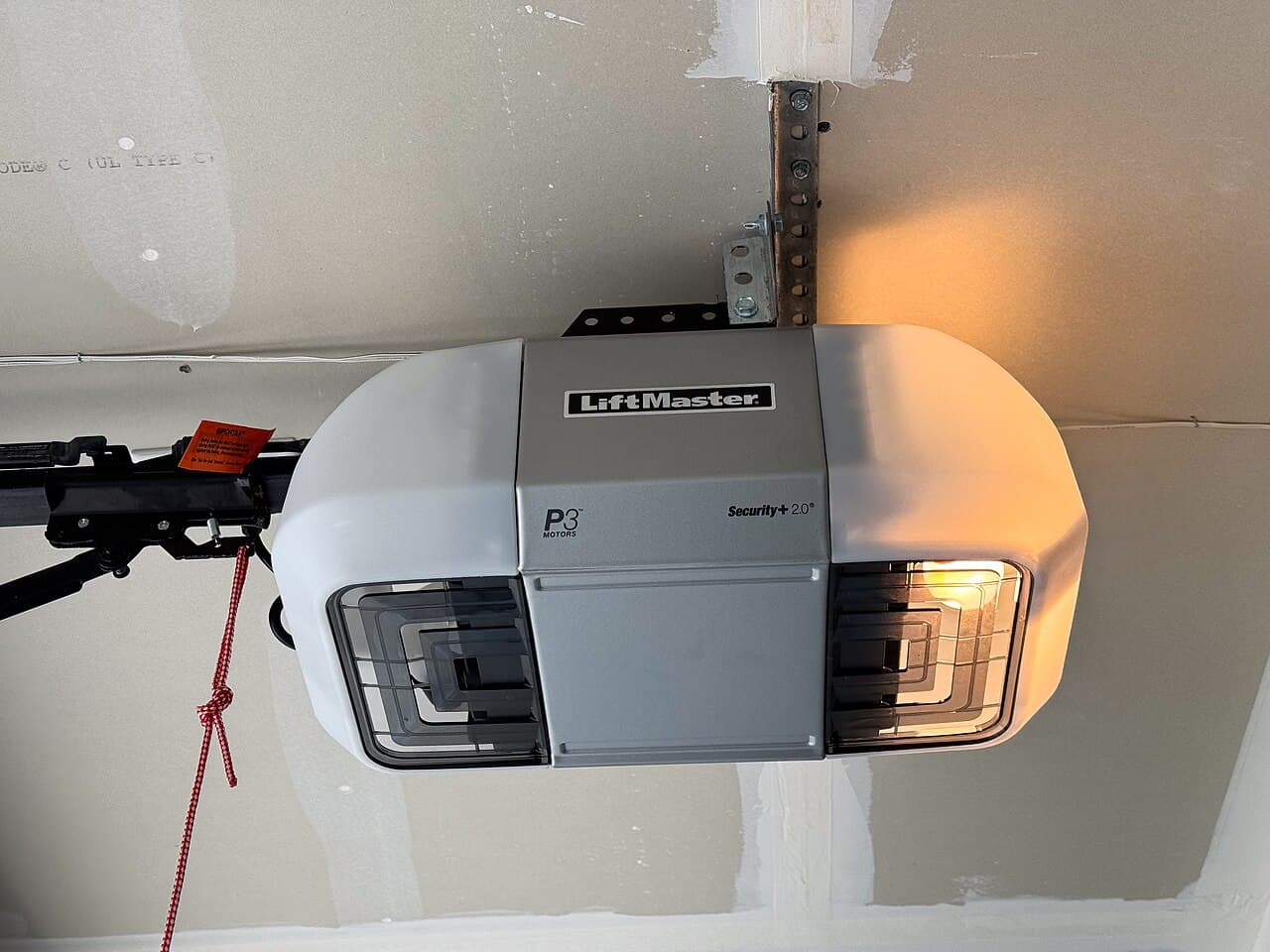
The Learn button is under the opener's light cover. Chamberlain says: "Look under the garage door opener light cover, on the same side as the antenna."[2] It is on the motor unit, high on the ceiling, so Chamberlain's own instructions say, "Use a ladder to reach it if needed and bring your remote up with you."[1] Set the ladder on level floor and do not lean out from it.
Then:
- Press and immediately release the Learn button.[1] The Learn button LED glows steadily.[1]
- Within 30 seconds, press and hold the button on the remote you want to use.[1]
- Watch for the opener lights to flash, or listen for two clicks.[1]
If the 30 seconds run out, start again. Press and release the button; do not hold it down.
If your wall control has a Learn button
Some wall controls have their own Learn button, which lets you program from the floor. Chamberlain's steps are to find the Learn button on the wall control, then "Press and release the Learn button twice." The LED begins blinking.[1] Within 30 seconds, you press and hold the button on the remote. The same flash or two clicks confirms it.
For models 8500 or RJO20, use the Learn button on the myQ Control Panel instead.[1]
Test it safely
Stand clear and press the remote. If the door moves, you are done. Then test the reversing system while you are there. CPSC says: "Place a 2x4 on the floor of the garage in the door's path." If the door does not properly reverse on striking it, the opener should be disengaged until it is adjusted according to the owner's manual, repaired or replaced.[4]
Keep the remote control door opener device away from children.[4]
Stop and call a pro if
- The door does not reverse on the 2x4. Disconnect the opener from the door with the release cord, and have it adjusted or replaced.[4]
- The door is unbalanced, binds or sticks. CPSC says that if doors are not "balanced," or if they bind or stick, they should be serviced by a professional.[4] Do not touch the springs or cables.
- There is no Learn button, or the opener ignores every remote. The opener may be an older model or its receiver may have failed, which is a repair-or-replace question.
- You would have to work on wiring to get to the opener. Programming a remote never needs that.
Getting help in Virginia
If it is the opener that is failing, read should I replace my garage door opener or repair it and how much a new opener costs installed. For a remote built into your car, see programming a car's built-in opener. Browse more garage door answers or garage door pros on Loclis.
When you are ready, describe the problem once and local pros will quote it.
Common questions
- Where is the Learn button on a garage door opener?
- On a Chamberlain opener, look under the opener's light cover, on the same side as the antenna. Its color matters, because Chamberlain lists the Learn button colors each remote works with.
- How long do I have to press the remote after the Learn button?
- Chamberlain's instructions give you 30 seconds: press and release the Learn button on the opener, then within 30 seconds press and hold the button on the remote.
- How do I know the remote has been programmed?
- Chamberlain says the opener lights flash, or you hear two clicks. If neither happens, start again with a fresh remote battery.
- Will any remote work with my opener?
- No. Chamberlain's current 3-button visor remote is listed for green, orange/red, purple and yellow Learn buttons, so match the remote to the color on your motor unit.
- Is it safe to leave the remote in the car?
- It is a security choice more than a safety one, but CPSC's advice is to keep the remote control away from children, and a remote left on a visor is easy for anyone in the car to press.
Sources
- [1] How to Program a Remote Control to a Garage Door Opener, Chamberlain Group support. Checked October 27, 2026.
- [2] Garage Door Opener Remote Replacement, Chamberlain. Checked October 27, 2026.
- [3] 3-Button Visor Garage Door Remote (G953EV-P2), Chamberlain. Checked October 27, 2026.
- [4] Non-Reversing Automatic Garage Door Openers Are a Hazard (Pub. 523), U.S. Consumer Product Safety Commission. Checked October 27, 2026.
Want a pro to handle it?
Describe the job once. Licensed local businesses send quotes, and you pay only when you book one.
Get a quote from a local pro