How do I set up surround sound in a living room?
Start with a receiver or soundbar that has enough HDMI inputs, plug it into the TV's HDMI ARC port, place the front speakers either side of the TV and the rear speakers beside or behind the seats, run the auto-calibration, then set the volume where you can talk over it. Keep cables on the floor or wireless, anchor the TV, and leave in-wall wiring to a pro.
Free to ask. Local shops send quotes, and you pay only when you book one.
By Kasra Taheri, Founder, LoclisPublished
Researched and drafted with AI, then checked claim by claim against the sources listed below before it was published. Prices and rules change; the dates beside each source say when it was last checked.
Step by step
Read when to stop and call a pro, further down this page, before you start.
Step 1: Count your HDMI inputs
List what will plug in, such as a game console, a sound bar or receiver and a cable box, which together need 3 HDMI inputs.[1]
Step 2: Choose the audio hub
Pick a soundbar kit or an AV receiver with the number of speakers you want, and put it on a stable shelf with room around it for air.
Step 3: Place the front speakers
Put the left and right speakers either side of the TV, facing the seats, with a center speaker under or above the screen if your system has one.
Step 4: Place the rear speakers
Stand the surround speakers beside or slightly behind the main seats, roughly at ear height when you are sitting.
Step 5: Place the subwoofer
Set the subwoofer on the floor near the front wall, then move it a few feet if the bass sounds boomy in your seat.
Step 6: Connect the speakers and TV
Plug the speaker cables or wireless speaker power cords into the receiver and wall outlets, and run one HDMI cable from the receiver to the TV port labelled ARC or eARC.
Step 7: Route cables along the edges
Run speaker wire along the baseboard or under the rug edge, not across a walkway, and fasten it with cable clips made for the purpose.
Step 8: Run the auto-calibration
Plug in the setup microphone that came with the receiver, sit in your usual seat and run the calibration so it sets speaker levels and distances.
Step 9: Set a safe volume
Play a movie and set the volume so conversation is easy; sounds at or above 85 dBA can cause hearing loss with long or repeated exposure.[2]
Step 10: Anchor the TV and stand
Fasten the TV and its furniture to the wall with the straps or brackets the manufacturer provides.[3]
A good living-room surround setup is mostly planning: enough HDMI inputs, speakers placed around the seats, cables kept out of the way and a quick calibration. Everything below works with plug-in gear, which is what you should stay with unless you hire someone for in-wall work.
Start with your inputs and your hub
List everything that will connect to the TV. ENERGY STAR's rule of thumb is that "Accommodating just standard elements of an entertainment system, like a game console, a sound bar, and a cable box, requires 3 HDMI inputs."[1] A receiver gives you more inputs and sends one cable to the TV. Look for one with a port labelled ARC or eARC, and plug the TV's matching port into it.
A soundbar is the easy option. ENERGY STAR says the speakers in today's thin TVs are small, and "This results in a tiny sound with inferior bass prone to distortion at high volume."[1] A soundbar with a wireless subwoofer and rear speakers is simpler to place than a full 5.1 set.
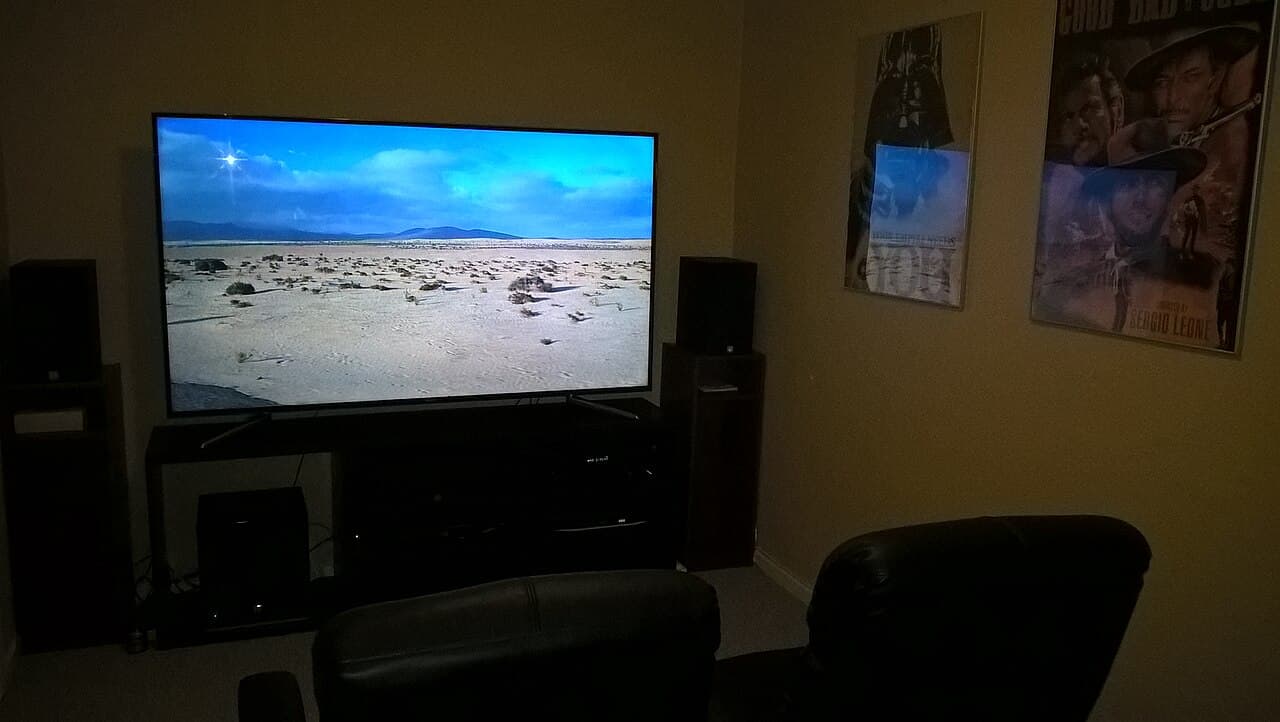
Place the speakers
Sit where you normally sit, then work outward from there.
- Front left and right go either side of the TV, facing the seats, with the tweeters roughly at ear height. A center speaker goes directly under or over the screen.
- Surround speakers go beside the seats or slightly behind them. Stands or shelves are fine, and they work best a little above ear level.
- The subwoofer goes on the floor, usually near the front wall. If the bass is boomy at your seat, try a different spot; a few feet makes a surprising difference.
If the room is small, a 3.1 or 5.1 layout is plenty. Leave 7.1 and overhead speakers for a larger or dedicated room.
Connect and calibrate
Wired speakers connect to labelled terminals on the receiver; match each speaker to its channel and keep the plus and minus ends consistent. Wireless speakers need only a power cord and a pairing step in the app.
Run speaker wire along the baseboard or under a rug edge, fastened with clips made for the job, and never across a walkway. Then run the receiver's auto-calibration: put the microphone at your seat and let it set levels and distances. Finish with a manual check, using a movie scene with dialogue, and nudge the center speaker up if voices are hard to follow.
Set the volume with your ears in mind
Surround systems can get loud. The NIDCD says "Sounds at or below 70 A-weighted decibels (dBA), even after long exposure, are unlikely to cause hearing loss."[2] It adds that long or repeated exposure to sounds at or above 85 dBA can cause hearing loss,[2] and that "The louder the sound, the shorter the amount of time it takes for NIHL to happen."[2] Set the level where you can talk over the movie, and be conservative with children in the room.
Anchor the TV and its furniture
A bigger TV on a low stand is a tip-over risk. In the CPSC's review of 363 reported tip-over fatalities, 62 percent (226 deaths) involved televisions falling,[3] and 303 involved children.[3] The CPSC also notes there is no requirement for restraint systems to be included with the television,[3] so you may have to buy anchors. It adds that the typical anchoring system consists of screws and fabric straps that affix the furniture to the wall.[3]
Stop and call a pro if
- You want speaker or HDMI cables inside the walls or ceiling. In-wall and ceiling speakers mean cutting into drywall and sometimes working around framing and insulation. Virginia's building code exempts from a permit the installation of wiring and equipment that (i) operates at less than 50 volts, but not when it is "located in a plenum, penetrate fire rated or smoke protected construction" and so on.[4] A pro knows where those lines are.
- You need a new outlet or a dedicated circuit. Anything that touches house wiring is electrical work, not a DIY job.
- The cables must pass through a fire-rated wall or ceiling, such as one between a garage and the house, or run through a plenum space.
- You are mounting the TV or speakers on a wall that you cannot confirm is solid. A heavy TV falling is exactly the hazard the CPSC describes.
- You want a projector, acoustic treatment or a theater room built. These involve ceilings, framing and wiring.
Getting help in Virginia
Virginia defines the trade of installing sound systems as part of its electronic and communications specialty: the installation, repair, improvement, or removal of electronic or communications systems annexed to real property including telephone wiring, computer cabling, sound systems.[5] If you hire out the wiring, see should I hire a pro to install a home theater and how much home theater installation costs in Virginia. Browse more security and smart home answers or Security & Smart Home pros.
When you are ready, describe your TV and speaker job once and local pros quote it.
Common questions
- Do I need a receiver, or is a soundbar enough?
- A soundbar is the simplest way to improve a TV. ENERGY STAR notes that today's TVs are so thin that the result is a tiny sound with inferior bass prone to distortion at high volume, and a soundbar fixes much of that. A receiver with separate speakers gives a wider, more convincing surround effect but takes more room and setup.
- Which HDMI port on my TV should I use?
- Use the one labelled ARC or eARC for the cable that runs to the receiver or soundbar. That lets the TV send its own apps' sound to your speakers over the same cable. Plug your console and cable box into the receiver's inputs.
- Can I use wireless rear speakers?
- Yes. Many systems offer wireless rear speakers, which avoids running wire across the room. They still need a power cord and a wall outlet, so plan where they will sit.
- How loud is too loud?
- The NIDCD says sounds at or below 70 dBA are unlikely to cause hearing loss even after long exposure, while long or repeated exposure to sounds at or above 85 dBA can. The louder the sound, the sooner damage can happen, so keep movies at a level where you can talk comfortably.
- Do I need a permit to wire speakers in Virginia?
- Not for ordinary low-voltage speaker wiring. Virginia's building code lists the installation of wiring and equipment that operates at less than 50 volts among the work that does not need a permit, but not when it runs through a plenum or penetrates fire-rated construction. Check with your locality if the work goes through walls or ceilings.
Sources
- [1] Televisions, ENERGY STAR, U.S. Environmental Protection Agency. Checked October 27, 2026.
- [2] Noise-Induced Hearing Loss (NIHL), National Institute on Deafness and Other Communication Disorders, National Institutes of Health. Checked October 27, 2026.
- [3] Preliminary Evaluation of Anchoring Furniture and Televisions Without Tools (CPSC/EXHR/TR-15/001, May 2015), U.S. Consumer Product Safety Commission. Checked October 27, 2026.
- [4] 13VAC5-63-80, Section 108 Application for permit (Virginia Uniform Statewide Building Code), Virginia Administrative Code, Virginia General Assembly. Checked October 27, 2026.
- [5] 18VAC50-22-30, Definitions of specialty services (Board for Contractors Regulations), Virginia Administrative Code, Board for Contractors. Checked October 27, 2026.
Want a pro to handle it?
Describe the job once. Licensed local businesses send quotes, and you pay only when you book one.
Get a quote from a local pro